
Common App is the most popular online college application portal that lets you apply to multiple colleges/universities (mostly US, but also some in Europe and Asia) with one main application. Instead of filling in every detail for every single university, you can complete a single set of details, then add a college and fill out its specific details. It has over 1100+ partner universities, and you can apply to at most 20 universities through this platform.
Applying with the Common App:
-
Creating a Common App account
-
Understanding the interface of the Common App
-
Filling out the Common App
-
College-specific supplement
-
Recommendations section
Creating a Common App account:
You can simply go to your web browser and search for the Common App. You can create an account using your Gmail. You may be applying as a first-year student, so create your account as a first-year applicant. If you have a mobile phone, you can simply download the Common App from your Play Store or App Store. Once you create your account, you can log in and begin your journey of college hunting.
Understanding the interface of the Common App
The new interface of the Common App looks something like this
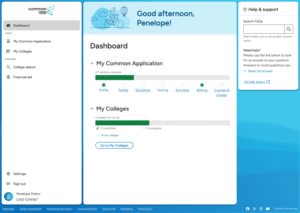
‘My Common Application is the interface visible in front of you. You can easily navigate to various sections and fill in your details from there. The green line shows the level of progress you have made.
‘My Colleges’ section allows you to select colleges/universities of your choice and add them to your list, but remember, you cannot add more than twenty colleges.
To learn more, you can always refer to the ‘FAQs’.
Filling out the Common App:
This is the place where things get pretty messy. Most of the students get lost in this section and end up making mistakes.
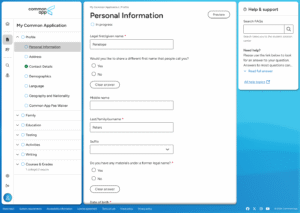
You can go here by clicking on the Profile Section under My Common Application.
In the Profile section, there are many sub-sections; we will cover each of them in order.
- In the Personal Information section, you are required to fill up your name and date of birth. You can always see how you have filled in your details using the preview option in the top right corner.
- In the Address section, you are expected to fill in your details of both your temporary and permanent addresses.
- In the Contact section, you are instructed to enter your contact details. Generally, student enter their phone numbers.
- In the demographics section, if you are a Nepali student, you should identify yourself as other South Asia and specify Nepal.
- In the Language section, you are expected to enter the language/languages you are proficient in in order.
- In the Geography and Nationality section, you should fill in your geography details. In the Visa type, you should select the F1 Visa.
- The Common App provides a fee waiver to apply to 20 universities if you meet their criteria. Mostly, Nepali students qualify for the last criterion of supporting the documents from the school officials. You can enter your full name as a signature, and your counsellor verifies your eligibility thereafter.
In the Family section, you should fill in your parents’ details, including their full name, occupation, phone number, and degree. You should also report your sibling’s (your brother or sister) information.
Tips: The prefix part is for the education level. For example, if your parent holds a doctorate, you should report as Dr.
Most of the students end up making a lot of mistakes in the Education section. Let us cover everything in detail.
In the Current/Most recent high school subsection, you should search for your most recent high school: the school from which you gave your SLC (12th exam). If you don’t see the name of your school in the list, then it’s completely okay. Most high schools in Nepal are not registered in the Common App. You can manually add your school after clicking on the ‘I don’t see my high school’ option.
Is this a boarding school?
For this question, click yes only if your high school requires compulsory housing (eg, Budanilikantha), else you should select no.
Did or will you graduate from this school?
You should select a yes unless you have some exceptional circumstances.
Please indicate if any of these options will have affected your progression through or since secondary/high school.
You need to be careful here. If you are from NEB, then you would apply after you graduate and receive your transcript. So, you are in your gap year. For A-levels and IB students who apply before graduation using their predicted grades, they would have no change in their progression. If they also apply in a gap year, they should also select the gap year option.
After you select ‘Did or will take a gap year’. They will ask you for the cause. You have 250 words to explain your situation. Students generally share the reasons behind the gap year, like exploring interests or some unavoidable circumstances.
In the other Secondary/High Schools section, they are asking you if you changed your high school (remember, it’s not for your elementary or middle schools). This practice is common in Nepal since many students change their high school after the SEE (grade 10) exam. You should mention the number of high schools you have attended. If you haven’t, then you can select zero and leave this section. If you choose yes, then they will ask you for the start date and the end date. You should mention the date beginning from grade 9, not from kindergarten.
Afterwards, they will also ask you the reason behind changing schools. Student normally respond by saying that this practice is in Nepal, explaining their cause.
In the Grades section, you are asked to report your class size, class rank, and GPA. For NEB students, GPA is unweighted, and the scaling range is 4. In cumulative GPA, you can fill in either your final year grades or the average of all the grades of your high school career. A-level and IB students should follow their respective GPA scaling and report their grades.
The College and University section is generally skipped
In the current or most recent year courses section, you should report all the courses that you took recently. For NEB students, this means the subjects you studied in grade 12 (eg, Physics, Chemistry, social…). Let me give you a sample:
Course 1 subject: Physics
Course 1 name: Physics
Course 1 level: Regular/Standard or N/A (both are valid)
Course 1 schedule: full year
In this way, report all the courses. The same things hold for A-level and IB students.
Now comes the Honors section. The Common App lets you report five of your academic honors (from grades 9-12). This may include quiz wins, olympiad wins, speech/debate wins, academic excellence, etc. The Common App provides just 100 characters to report your honors; thus, you should learn to present them wisely.
Here is a sample Honor for inspiration:
Absolute winner in PABSON state debate cup (Among 100+ schools)
To learn more about what counts as honors and how to present your honors soundly, refer to our ‘honors’ blog.
In Community-Based Organizations, you can list the organizations that assisted in your college application. Most students leave this blank.
Similarly, in the Future Plans, you can mention your career interests (eg, Phd in CS).
In the testing section, you can report your test scores. This includes the standardized tests, English proficiency tests, and other tests. You should report your accurate test scores and test date in this section.
In the testing section, you will find this question too:
International applicants: Is promotion within your educational system based upon standard leaving examinations given at the end of lower and/or senior secondary school by a state or national leaving examinations board? (Students studying in the US typically answer no to this question.)
NEB students should report yes, then they should list the exams they took. They chose 6 exams as they have 6 subjects. To understand it better, let’s look at a sample:
Date Taken: May 2025
Examination board: HSEBE or SLC
Academic subject: Account
Score: A+
Score type: Actual
In the Activities Section, the Common App lets you fill out up to ten activities. It is not compulsory to list all ten activities, but it is generally recommended. You should select the activity type, organization, your position, and description. Since there are limited characters, you must learn to present them effectively.
Here is a sample activity for inspiration:
Curriculum designer & Tutor
Ganeshman Tuition Centre (5 years)
Designed optics curriculum for HS students; tutored 30 students physics, improving their scores by 25%; awarded best teacher by the institute
To learn more about what counts as activity and how to frame them, please refer to our blog on ECA.
In the Responsibilities and Circumstances sub-section, check all the circumstances that affected your academics and Activities. Report all those that are genuine.
Now it’s time for the Writing Section. It is one of the most important parts of your application. You are given seven prompts and a 650-word limit to write your Common App essay. You can write a single essay and send it to all the universities. Remember, it is not like your school exam essay. You should give a considerable amount of time and effort to your essay. It generally takes weeks or sometimes months to write a good essay.
To learn more about the Common App essay, read our article on the Common App essay.
In the Additional information section, you are provided a space to tell about the challenges you faced. This may include Family crisis, Housing issues, bad health, etc. This will help colleges learn better about your background. Likewise, there is also a 300-word space to report on additional information not included in your application. Here, you can talk about your extra activities or honors, or elaborate on the existing ones. Don’t write paragraphs; instead, use bullet points to express yourself.
There are very few universities that ask you for your Courses and Grades. If your list has no such university, then you can leave this part. However, you do have one, you can fill out the courses and report the grades, respectively.
College-specific supplement
Once you are done with the Common App, you can add a college and proceed to the college-specific supplement. College generally asks you for your basic info, family background, intended major, etc. Nevertheless, there are many colleges (especially those that are generous) that ask for supplements. This may include supplemental questions, video-portfolio, art-portfolio, etc. Through the supplemental questions, colleges want to know how well you have researched them. They also want to know more about your experiences and what kind of student you will be to contribute to their campus.
Supplemental questions generally ask the following:
Why this major?
Why our university?
What can you contribute to the campus?
What kind of fellow student will you be?
What are your interests?
To learn more about supplements, refer to our ‘Supplemental essays’ article.
Recommendations section
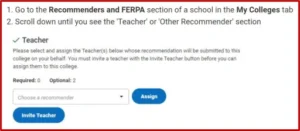
After you are done with the application, you should invite a recommender. Normally, Colleges ask for three recommendations: Two from your teacher and one from a counsellor. After your invitation, your counsellor and teachers come and fill out some details and issue your LOR.
Remember, you should maintain a friendly relationship with your teachers to get a standout LOR.
Apart from these, you can also send additional LORs to colleges. These may be LORs you receive from your research mentor, employer, or other person who can talk about your qualities.
To learn more about the Letter of Recommendation, refer to our blog on LOR.